
Photo & Video
Browse photo and video IPA listings for cameras, editors, recording tools, streaming apps, and creator workflows.

Verba Creative Inc.
Unlock the full potential of your video content with Verba, an innovative Ukrainian application designed for seamless subtitle generation and video editing. Transform the way you create and enhance your videos with Verba's powerful features. Craft captivating content effortlessly and captivate your audience across various platforms. Key Features: Automated subtitle generation: Let Verba's advanced AI analyze your video content and generate subtitles automatically. Say goodbye to tedious manual work, and let Verba handle the intricacies, saving you time and effort. Engaging stickers and audio sound: Add an extra layer of creativity to your videos with Verba's extensive library of stickers and audio sound options. Transform your content into an immersive experience, making it more appealing and shareable. Precise subtitle editing: Take control of your subtitles with Verba's intuitive editing tools. Modify existing subtitles, add new ones, and fine-tune them for clarity and comprehension. Customize subtitle styles with preset options or create your own unique style to align with your brand or personal preferences. Dynamic video enhancements: Elevate your videos with sound effects and stickers from Verba's built-in library. Effortlessly enhance the visual and audio experience, making your videos more engaging and lively. High-Quality video export: Export your videos in the highest quality possible, ensuring a stellar viewing experience across various platforms. Share your content confidently, knowing that it looks its best. Effortless video organization: Keep your video library tidy and easily accessible by naming and organizing your videos within the app. Simplify content management and ensure your videos are readily available for future reference. Terms of use: https://static.verba.digital/verba-terms-and-conditions.pdf


Dharmik Ujariya
Video Downloader - Video Download Video Saver - Save Videos Create amazing Insta Reels and social media videos using Reelsy. It has over 500 reels templates, original audios, trending musics and so much more. Perfect for Instagram Reels and Tiktok. Create high-quality content like a professional. Make your posts stand out with pre-made reels templates for any occasion from fashion, fitness, travel, party, and more. You can easily create eye-catching video content. There are hundreds of reels templates and trending music to choose from on Reelsy. Create cool videos in seconds Sync your photos and videos to the beat High quality reels templates with trending audios 10+ different categories 100+ reel templates Popular musics from Instagram and Tiktok No watermark on videos Use Reel Maker to make the most incredible Reels, Insta Stories, and social media posts. With over 500 unique, animated templates, original text styles, music, and more, you’ll see why we’re the number one content-making app. Stop blending in and stand out whatever the occasion with our creative templates. Whether your focus is fashion, fitness, photography, or anything else, we’ve got you covered. Influencers, content creators, entrepreneurs, online shops, and more than 30 million people are already using Reel Maker to enjoy our Instagram photo editor features for stories and more. Create a professional brand image using Reel Maker to easily create your social media content. Our new app helps you creates content that stands out in just a few taps. Reel Maker has hundreds of text styles, animated templates, and a huge music template to try out. Personalize them with your own photos or videos and save them to your photo library or share them to any social media channel from your phone in just a few clicks. Use Reel Maker to make your social media stand out with beautiful and unique content. ▶* Reel Maker FEATURES – CREATE ANIMATED INSTAGRAM STORIES ·Templates for Every Platform We’ve got loads of Insta stories, Reels, and social media post templates to up your social media game. Whatever the reason and whatever your style, we’ve got something for you. · Video Editing Our video editing features are next level and can help you create video collages and add filters, special effects, and even more! · Original Text Effects Text Styles & Effects Fed up with Instagram’s text options? We’ve got lots of text styles that will help you create original and creative content guaranteed to get people talking. Don’t just say what you want to say, say it in style. You can easily add awesome effects and texts overlays to your pictures and video · Add Your Own Photos and Videos Want to take your content to the next level? Easily customize our templates with your own photos and videos or use our stock photo selection to make your personality or business sparkle! · Animated Stickers Stickers add personality and a bit of sparkle to your Insta stories! We’ve got a whole library of cute stickers perfect for your stories. · Multiple Page Stories You can create a story with more than one page. You can even add music to your sequence using our music library. Some of our templates and features are totally free! * Reel Maker PRO However, you may want to think about buying Reel Maker Pro to support us and enjoy advantages including: . Access to every template and text style . Background removal with just one tap. E-sales templates . Templates that help you build your brand, boost sales and highlight your brand . Personalize our templates and add animation, fonts, logos, and brand colors . Brand-new text styles and template designs each month . Get the perfect Insta size by changing the image size to square, landscape, or portrait Explore and test out our incredible Insta Story Editor and templates now. Privacy Policy - https://www.freeprivacypolicy.com/live/e2e86ced-30a6-48b8-82b5-8643b4781023 Terms - https://www.apple.com/legal/internet-services/itunes/dev/stdeula/


Anthony Durbin
Fix blurry photo, enhance quality and restore old photos instantly. This unblur photo enhancer app turns your old, blurry, low resolution photos into crystal clear HD with Artificial Intelligence. Repair photos, sharpen portraits, de-noise photos and improve face details with this amazing photo enhancer app. Use Unblur to: - Turn facial photos into high-definition - Upscale image resolution with AI - Descratch: remove scratches to restore vintage photos - Colorize old black & white photos. - Turn words into photos with Artificial Intelligence. This app includes advertisements. To enjoy ad free experience and use all premium contents, we are offering a Premium subscription package. Unblur Premium Subscription information • Subscription Length: weekly, monthly or yearly. • Your payment will be charged to your iTunes Account as soon as you confirm your purchase. • You can manage your subscriptions and turn off auto-renewal from your Account Settings after the purchase. • Your subscription will renew automatically unless you turn off auto-renew at least 24 hours before the end of the current period. • The cost of renewal will be charged to your account 24 hours before the end of the current period. • When canceling a subscription, your subscription will stay active until the end of the period. Auto-renewal will be disabled, but the current subscription will not be refunded. • Any unused portion of a free trial period, if offered, will be forfeited when purchasing a subscription. Privacy policy: https://sites.google.com/view/anthonydurbins/privacy Terms of service: https://sites.google.com/view/anthonydurbins/terms Contact for support, reporting bug or improvement suggestions email: [email protected] You may also contact our support team through the app’s settings screen.

Moment Inc.
Your Camera, Your Looks, Your Way. Moment Pro Camera II turns your phone into your favorite camera for photography and filmmaking. Shoot like a pro with full manual controls, creative looks, and an upgraded interface – all in one intuitive app. What’s New in Pro Camera II? Our first pro camera app has been the #1 rated camera app for years. Now, it’s time for the next chapter. We’ve re-engineered Pro Camera II from the ground up to give you better performance, advanced controls, and new customizable interfaces and shooting modes. Key Features: • Pro-Level Exposure Control – Our smart exposure system allows you to take control with Shutter Priority, ISO Priority, Manual, and Auto exposure modes, including the ability to limit Auto ISO to a specific range. • Upgraded White Balance – Beyond auto white balance, you can manually configure temperature and tint, choose a preset, or calibrate via a gray card. • Advanced Photo Options – Control the level of processing and HDR applied to your photos. Shoot in RAW, ProRAW, TIFF, HEIF, or JPG. • Cinematic Video Tools – Apple Log, Open Gate, ProRes, 10-bit recording, and more. Adjust the resolution, color space, frame rate, codec, bitrate, and chroma subsampling for total creative freedom. • Precision Monitoring – Get pro-level feedback with Waveform, RGB Histograms, and audio meters — normally reserved for cinema cameras. • Aspect Ratio – Frame your shot within your favorite aspect ratio (4:3, 16:9, 3:2, 5:4, 1:1) • Designed for All Creators – A beautiful, intuitive interface that adapts to how you shoot. Swipe, tap, and adjust anything immediately with one hand (including a dedicated left-handed layout), or go distraction-free with Zen Mode. Works natively in landscape orientation. • Looks, Your Way – Apply creative Looks or import your own LUTs to video and photos. Preview them live, bake them into your footage, or adjust intensity on the fly. • Focus Tools That Just Work – Separate reticles for exposure and focus with a tap, or dial in the shot with Manual Focus and Focus Peaking. • Quick Actions, Faster Shooting – One swipe to reach your most used tools: flash, stabilization, zebras, focus peaking, grids, and more. • Intuitive Lens Control – Remove the guesswork of which lens you are using and eliminate surprises with our Optic Controls. Say goodbye to shaky zoom with our fluid zoom control. • Hardware-Ready – Optimized for every iPhone, with seamless integration for external mics and Moment’s entire lens + case ecosystem. Upcoming Feature Releases • Look Store: purchase creator color grades and film emulations • Slow Shutter and Timelapse modes • Advanced Profile sharing and collaboration tools • Extended hardware integration partnerships We love hearing from our community. For feature requests, ideas, or support, email us at [email protected] or message us @momentprocamera on social media. Fully Compatible with iPhone and Moment's complete ecosystem of lenses, cases, and accessories.

ipaomtk.com
ipaomtk.com | Introduction Rodjo IPA is an iOS habit-building and productivity application designed to help users create, track, and maintain positive


Sohel Ibna Saad
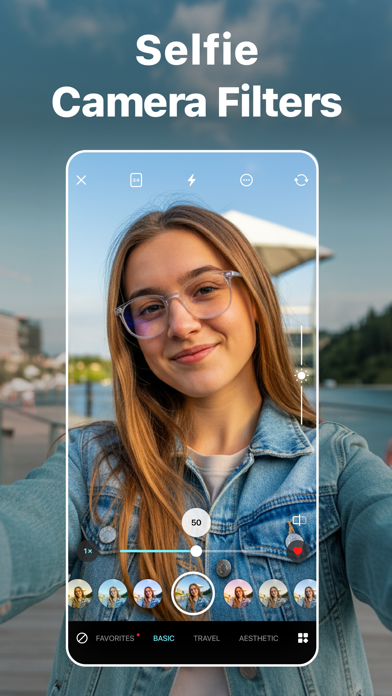
Discover the power of visual flair with GlamUp, your ultimate companion for adding filter effects to your photos with some striking features. From an extensive filter library to editing tools, this photo filter app for iPhone is the ideal gateway to show your creativity. Add cool filter effects to your photos by seamlessly importing images from the library or using the built-in camera. Have you fallen in love with a particular photo filter? Simply mark it as a favorite for swift access for future use. After editing photos on your iPhone, you also get the option to save and share on socials. Key Features: • Browse 150+ free photo filters • Adjust filter intensity to achieve the perfect look • Import photos from the library and camera to add picture filters • Mark any image filters as favourites for quick access • Quickly save edited photos on your iPhone and share to social media platforms • Customizable filter categories AESTHETIC PHOTO FILTERS You get a wide selection of over 150 carefully designed photo filters spanning categories such as Basic, Aesthetic, B&W, Retro, Vintage, etc. Whether you're looking to enrich the colors of photos or nature scenes or give your portraits a classic touch, there's a perfect filter for every occasion. CUSTOMIZE THE INTENSITY Take control of your artistic vision by effortlessly adjusting the filter intensity with this photo editor app. Never compromise on the perfect look; tailor the best filters to your specifications to create professional photos or add a personal touch. FILTER MANAGEMENT Have you fallen in love with a particular photo filter? Using this photo filter app, you can simply mark it as a favorite for accessing future creative projects. You also manage the filter categories by hiding options and arranging them in an order that suits the creative flow. How to make a photo black and white using the GlamUp - Filters for Pictures app? If you want to know how to make a picture black and white on an iPhone, go through the following steps. - First, open the GlamUp app - Then, choose an image from the Photos app or click one with the Camera - After choosing one, swipe right to select B&W from different photo filters - Toggle the bar right below the image to adjust the intensity - Finally, tap on the top right corner to save or share on social media How to make a photo look vintage using the GlamUp app? Are you searching for the best vintage photo booth for your professional photos? Look no further, as GlamUp has got you covered. - To start, install and open this photo filter app - Next, choose your favourite image or click one - From there on, tap on the Vintage photo filter - You can also modify the intensity of the filter effects - To save or share, click the button on the top right corner Terms of Use: https://pixeltouch.net/legal/filters-for-pictures/terms.html Privacy Policy: https://pixeltouch.net/legal/filters-for-pictures/privacy.html

Cloudbit d.o.o.
Run Python code and learn Python on your mobile Device. Become a Pythonista with this AI powered mobile programming editor. Python coding on your mobile phone. You can run, execute, and evaluate Python code, scripts, and programs from this app. Python 3 interpreter and compiler on your device. Write functions, and classes and import modules from the Standard Library. Run your scripts and programs with a single tap, and see the output in a console window. Built-in AI Assistance, whenever you get an error in your code, AI can suggest how to resolve it. AI Assistant can refactor your code, clean it up, check it for bugs, write comments and docstrings or just explain it. Built in Debugger! Find bugs by stepping through your code line by line. Lightweight app with full code syntax highlighting, error checking, and code completion, just like a real Python IDE. This is the perfect app for anyone who wants to learn Python and write Python code. Elevate your Python skills with built-in coding challenges, solve them to practice and learn Python, and enhance your programming and problem-solving skills. New coding problems are added regularly. Learn Python with the official tutorial. Read the official Standard Library documentation from the app. Learn about data types, functions, classes, and programming constructs. Edit your code with a full-featured code editor that supports code syntax highlighting, undo and redo, opening files, themes, colors, and fonts. Test your programming knowledge, the coding editor will tell you if you are writing valid code. Whether you are a beginner or a professional, this app will help you improve your Python programming skills. Use this coding editor to become a Pythonista and a better developer. Note that certain features are available only with the developer upgrade.


Dailymotion S.A.
Dailymotion turns every video into a living social space : a place to create, talk, and belong. Not a feed to chase views, but a community built around conversations. Watch → talk. Post → connect. Create → be you. Because views without vibes are boring. Because your niche deserves a home. Because video should bring people together, not push them apart. Dailymotion is where Gen-Z and everyday creators can record, edit, and publish with pro-level mobile tools, then build real back-and-forth with the people who get them. It’s familiar, but it works better: calmer design, healthier interactions, smarter discovery you can tune. Tools and spaces inspired by what creators love on platforms like TikTok or Discord, rebuilt for conversation and community. CREATE YOUR WAY - Chatrooms around videos: Join real-time conversations directly tied to each video for instant, meaningful back-and-forth. - Super-Like & Daily Boost: Once a day, give a video extra visibility and show creators stronger support. - Animated Captions: Auto-generated captions in 20+ languages that animate and highlight key moments. - Smooth Camera Zoom: Cinematic zooming with intuitive slide or pinch controls for polished shots. - Filters & Visual Styles: On-brand filters you can apply live or in the editor to keep a consistent look. - Full Video Editor: Multi-layer timeline with text, stickers, transitions, and effects for expressive videos. - Green Screen & Layouts: One-tap backgrounds, split screen, PiP, and background removal for richer storytelling. - Reset Your Feed: Restart your recommendations anytime to regain control of what you see. - Rate Videos Against Your Taste: Tell the algorithm what matches your vibe for cleaner, smarter discovery. - New Platform Design: Cleaner, bolder, more readable UI shaped with Gen Z expectations and powered by a unified design system. CREATE → CONNECT → BELONG Communities that feel like home. Real conversations, healthier interactions, and discovery you control. Bring your niche, your humor, your creativity and connect with people who get you. WHY DAILYMOTION Authentically social video: watch, talk, belong. Real engagement > empty impressions. Tools that help you express, not obsess. Feels familiar, works better.Bring your niche, your humor, your hot takes. Turn views into conversations and conversations into community. Join Dailymotion. -- Dailymotion Pass is an auto-renewing subscription. Subscription auto-renews unless cancelled at least 24h before the end of the current period. - Terms of Use: https://legal.dailymotion.com/en/dmpassst/ - Privacy Policy: https://legal.dailymotion.com/r/privacy


嘉豪 吕
- ImageX built-in a variety of latest image enhancement AI algorithms. - AI Super Resolution, enlarges the image, improve the image quality, noise reduction. - AI Frame Interpolation, improve the smoothness of animated image. - Dozens of pre-trained models, suitable for different styles. - Local offline processing, no upload required, ensuring privacy. - Support GPU hardware acceleration, faster processing speed. - Rich format, support JPG PNG APNG GIF WebP HEIC format. - No ads. - Supports iOS and Mac (sold separately). (For batch processing and faster speeds, we recommend the Mac version) Privacy Protection: All images are processed offline locally on the device, no uploading, no privacy risk. Non-Pro version restrictions: - iOS 1. Any side of the output that is higher than 1280 pixels or the output that is an animated image does not support saving and sharing. 2. Batch saving and sharing are not supported. - Mac 1. Any side of the output that is higher than 1280 pixels or the output that is an animated image will be ignored. Subscription: 1. Upgrade to Pro with Subscription or Lifetime Purchase to unlock full access. 2. If subscribing to the Pro version (monthly subscription or annual subscription; lifetime purchases are not included), the subscription will automatically renew unless you cancel the subscription 24 hours before the end of the next recurring date. 3. Pro for iOS and Mac are sold separately; iOS in-app purchases are only applicable to iOS App use, and Mac in-app purchases are only applicable to Mac App use. 4. For batch processing and faster speeds, please choose the Mac version. Privacy Policy: https://www.tinyperfectapps.com/res/imagex/policy/imagex_privacy_policy.html Terms of Use: https://www.tinyperfectapps.com/res/imagex/policy/imagex_terms_and_conditions.html Reference projects: Waifu2x - nagadomi/waifu2x: https://github.com/nagadomi/waifu2x (MIT) - lltcggie/waifu2x-caffe: https://github.com/lltcggie/waifu2x-caffe (MIT) - nihui/waifu2x-ncnn-vulkan: https://github.com/nihui/waifu2x-ncnn-vulkan (MIT) Real-CUGAN - bilibili/ailab: https://github.com/bilibili/ailab/tree/main/Real-CUGAN (MIT) - nihui/realcugan-ncnn-vulkan: https://github.com/nihui/realcugan-ncnn-vulkan (MIT) Real-ESRGAN - xinntao/Real-ESRGAN: https://github.com/xinntao/Real-ESRGAN (BSD3) - xinntao/Real-ESRGAN-ncnn-vulkan: https://github.com/xinntao/Real-ESRGAN-ncnn-vulkan (MIT) SRMD - cszn/SRMD: https://github.com/cszn/SRMD (MIT) - cszn/KAIR: https://github.com/cszn/KAIR (MIT) - nihui/srmd-ncnn-vulkan: https://github.com/nihui/srmd-ncnn-vulkan (MIT) RealSR - jixiaozhong/RealSR: https://github.com/jixiaozhong/RealSR (Apache2) - nihui/realsr-ncnn-vulkan: https://github.com/nihui/realsr-ncnn-vulkan (MIT) RIFE - megvii-research/ECCV2022-RIFE: https://github.com/megvii-research/ECCV2022-RIFE (MIT) - nihui/rife-ncnn-vulkan: https://github.com/nihui/rife-ncnn-vulkan (MIT) IFRNet - ltkong218/IFRNet: https://github.com/ltkong218/IFRNet (MIT) - nihui/ifrnet-ncnn-vulkan: https://github.com/nihui/ifrnet-ncnn-vulkan (MIT)


Movavi Emea LLC
Movavi is your go-to reels maker and video editor for creating awesome content in just a few taps. Whether you're sharing a vlog, filming your workout, posting food recipes, showing off drinks and desserts, or promoting your small business, this video maker helps turn everyday clips into stylish reels fast – no editing experience needed. TRENDING TEMPLATES FOR ANY VIBE You don’t even have to edit yourself! Just pick a template and turn raw clips into scroll-stopping reels instantly. • Choose from dozens of templates for vlogs, food, sports, travel, and more • Add your clips – the reels maker builds your video automatically • Get social-ready videos with smooth transitions, dynamic motion, and cool music • Polish after applying a template – trim, rearrange clips, tweak transitions, apply filters • Add AI captions and customize fonts, style, and layout to match your vibe SUPER-EASY VIDEO EDITOR The video editor gives you everything you need to adjust your clips as you like – effortlessly. • Cut and trim clips to keep only the highlights • Add stylish transitions between parts • Apply atmospheric filters and adjust colors to set the perfect mood • Add eye-catching effects: lens flares, sparkles, retro, and much more • Speed up, slow down, or reverse clips to add motion • Crop and resize your vids for any social media format TRENDING MUSIC AND SOUNDS Make your reels not only look cool, but sound amazing too. • Choose trending tracks from the music library or add your own • Align music perfectly with your clips • Lower or mute the original sound • Record voiceovers AI CAPTIONS WITH EXTRA STYLES Captions are a must for any reel! Add them automatically with AI, pick a design you like, and get people watching and liking your videos – even on mute. • Generate captions instantly – save time and boost engagement • Customize fonts and colors to match your video • Place captions anywhere on the screen BUILT-IN PHOTO EDITOR Movavi is more than a reels maker – it also includes a photo editor, perfect for creating eye-catching reel covers. • Apply stylish filters and creative effects • Remove background or swap the background with AI • Auto-enhance photos in seconds • Create collages with ready-made templates EXPORT AND SHARE ANYWHERE When your reel is ready share it instantly and get those likes. • Export in high quality, including 4K • Post directly to popular social platforms • Send your vids to friends, clients, or followers – make them go “wooow” Try Movavi App today – and create awesome reels in a few taps.


out thinking limited
Photo cut paste app to cut photo automatically and paste it. Supports both auto and manual modes. Thinking of cutting a portion of a pic and paste it in another image? Then Photo cut paste app is an option. Photo cut paste lets you to select a specific portion of an image, cut it and paste it in another image by adding a beautiful background to it. Cut out your pic and paste it in the image of a famous location which you haven’t visited and share it with your friends. Key Features 1. Easy to use 2. Many stunning backgrounds for your image. 3. Option to choose an existing background or one from the phone’s gallery. 4. Save the edited image to the phone’s gallery. 5. Share the image on platforms like Instagram, Facebook and Gmail. Subscription Terms - Subscribe to get unlimited video collage app access to all features. - Upon confirmation of purchase, the payment will be charged to the iTunes account. - Until you turn off the auto-renew at least 24 hours before the end of the current. period it will be automatically renewed. - If you decide to turn off auto-renewal, you can turn it off maybe by going to account settings after purchase. -The renewal amount will be charged from the account within 24 hours before the end of the current period. -As per the policy, cancellation of the current subscription is not allowed during the active subscription period. Once purchased, refunds will not be returned for any unused portion of the subscription period. Terms of use - https://www.outthinkingindia.com/terms-of-use/ Privacy policy - https://www.outthinkingindia.com/privacy-policy/


SNOW Corporation
The selfie camera that everyone's been waiting for. Introducing Soda, the easy and effortless beauty camera. •The perfect combination of filters and makeup Don't worry any more about which makeup and filter to use. Capture the most trendy styles with just one touch. • Beauty effects applied in real time Take the perfect selfie the first time around with no need for further edits Apply blemish-free skin touch-ups and natural beauty effects in real time. • A diverse selection of color filters optimized for selfies Try out the filters that best suit your skin! Capture an array of different moods using various selfie filters. • Take your photos from ordinary to extraordinary using the Portrait effect. Who said only iPhone users get to take dazzling portraits? Simply tap an area of the photo to adjust its focus and create something marvelous. • High resolution mode for exceptional selfies What's a selfie camera without the best in image quality? Take clearer selfies using our high resolution mode. • Terms of use: https://terms.snow.me/SODA/TermsOfUse • Terms of Use for Paid Products and Services: https://terms.snow.me/SODA/paidservice • Privacy policy: https://terms.snow.me/SODA/PrivacyPolicy - Face Technology by SenseTime Family Apps : B612, Snow, Foodie, Looks

Sohel Ibna Saad
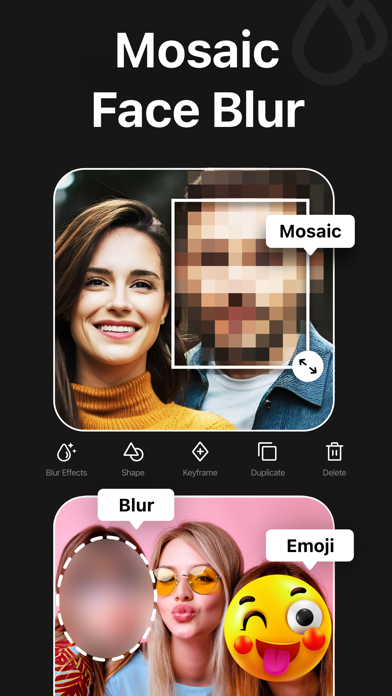
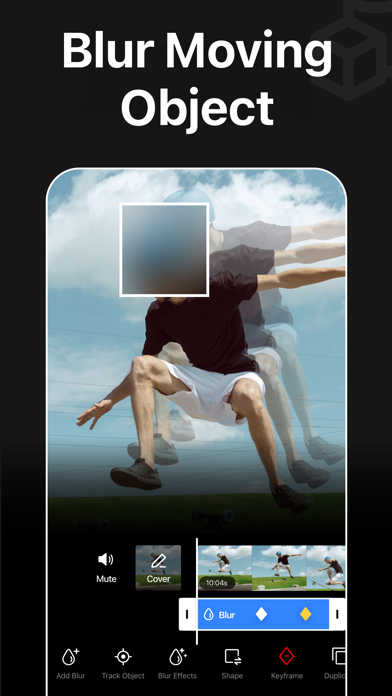
Blur Video is one of the best video mosaic + blurring apps for iPhone that lets you quickly hide people, faces, backgrounds, text, logos, car license plates, or any objects in a video like a pro. This powerful mosaic+ app can censor unwanted objects or obscure any parts of a video. You can also apply various filters, add stickers and text, or draw directly to enhance the overall look of your videos. Key Features: - Gaussian and Pixelate blur effects - Mosaic + blur faces in videos quickly and intelligently - Detect and track moving objects using AI - Automatically blur the background with AI subject detection - Rectangle and oval mosaic shapes - Use color, emoji, or photos to censor - Adjust mosaic intensity with precision - Use video keyframes to mosaic moving objects manually - Apply multiple stickers over your video - Add custom texts over video - Export videos in 480p, 540p, 720p, 1080p and Ultra HD - 4K resolution - Save in MP4 or MOV video format - HDR export for enhanced video quality - Remove metadata to protect data and privacy - Share videos to Instagram, TikTok, Facebook, YouTube, and other apps Robust Video Blurring Blur Video app simplifies the whole mosaic and blurring process. Mosaic or censor faces or track objects in your videos with advanced artificial intelligence. Getting blurry faces or censored videos has never been this simple. AI Face Blur Automatically mosaic or blur faces in your videos using intelligent AI detection. The mosaic+ app instantly identifies faces and keeps them accurately tracked throughout the entire clip, ensuring consistent, seamless blurring without any manual effort or setup. Mosaic Multiple Moving Objects Blur multiple objects in your videos with ease. Use AI-powered tracking to automatically follow moving elements, or take full control with manual keyframe tracking. Simply place keyframes where you want to mosaic or hide content and fine-tune the position as the video plays for precise, professional results. Smart AI Background Blur Instantly blur the background while keeping your subject sharp and in focus. Advanced AI detection intelligently separates people from their surroundings and applies a smooth blur effect to the background. How to mosaic + blur faces in a video using the Blur Video app? With this app, you can get censored faces in videos without any hassle. Just follow the steps below to know how to blur faces in videos easily. - Open the app - Select a video from Photos - Tap the AI Face Blur button to automatically mosaic all faces - Select the blur for more control - Choose the blur shape: rectangular or oval - Change the blur effects from Overlay to Gaussian or Pixelate - Adjust the intensity of your blur with the slider - After getting the desired output, tap on the Export button to save the video Auto-Renewable Subscription Terms: Subscribe to get unrestricted access to all the features outlined above. • Subscription Length: Weekly, Yearly • Subscription with a free trial period will automatically renew to a paid subscription unless it is canceled at least 24 hours before the end of the trial period. • Payment will be charged to iTunes Account at confirmation of purchase. • Your Apple ID account will be charged for renewal within 24 hours before the end of the trial period. • Manage and cancel your subscriptions by going to your account settings on the App Store. • Any unused portion of a free trial period, if offered, will be forfeited when the user purchases a subscription to that publication, where applicable. • By signing up for this subscription, you agree to our Terms of Use and Privacy Policy. Terms of Use: https://pixeltouch.net/blurvideo/legal/terms.html Privacy Policy: https://pixeltouch.net/blurvideo/legal/privacy.html Disclaimer: This app is free to download, but you will be required to sign-up for an auto-renewing subscription to access the app's full functionality.
MD Studio
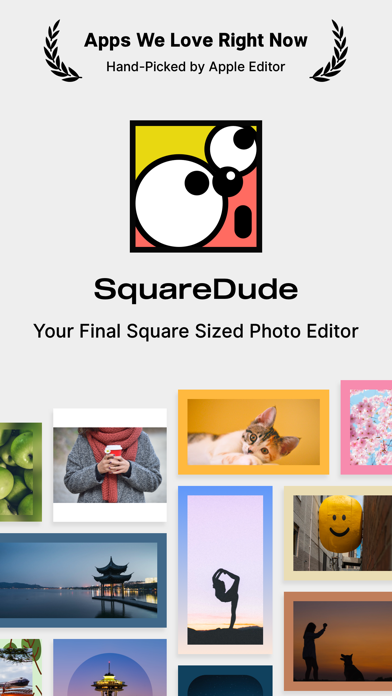
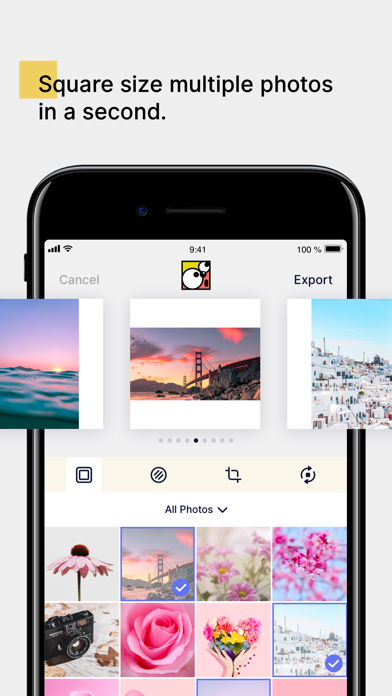
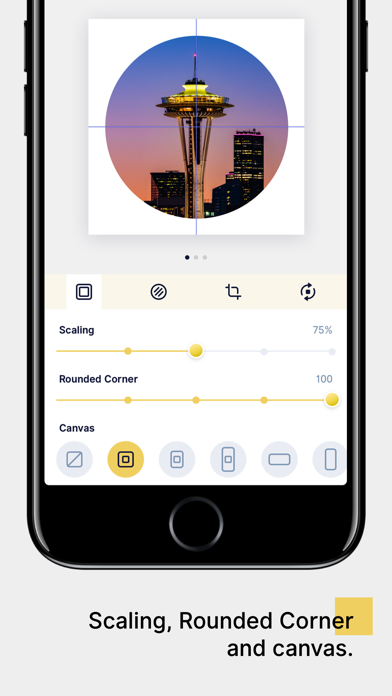
Featured in the 'Apps We Love Right Now' section, hand-picked by Apple Editor. SquareDude is designed for square sizing your photos and generator perfect image for sharing at any social network platform like Instagram. With SquareDude, you don't need to ask others for how can they get such amazing square sized images anymore. Meet SquareDude, it is not only your best tool for square sizing photo but also the ultimate photo editor on your phone. With SquareDude, you can: ## Square Size Multiple Photos with One Tap * Select up to 9 photos, then export the squared photo to albums in high quality within one second. * Any editing actions can apply to all selected photos, no more repeated works. ## Scaling, Rounded Corners, Customized Canvas with Any Size * Scale your photo to leave blank space, get them Instagram-ready. * Rounded corners, you can even get round shaped image with corner set to 50%. * Canvas is 1:1 by default, but we also support 4:5, 16:9, 9:16, 4:3, 3:4, 3:2, 2:3, 2:1, 1:2 and border-less canvas. ## Colors * We picked over 100 colors that are perfect to be your photo's background. * With Pro features, provide smart color based on the selected photo. * Long press to pick a color from the photo, can't wait to be impressed. ## Gradients * We generated over 100 gradient colors for you. * Control the gradient direction freely, we provide 8 options. * With Pro features, use a gradient with 3 colors. ## Blur * Use the blurred photo as background, we provided 6 blur levels for you to choose. ## Crop * Crop concerning the canvas. * Crop multiple photos with the same canvas size, enjoy being creative and neat. ## Pro Features * Multiple Photos Square Size * Smart Color Picking * Manually Color Picking * Unlock All Colors, Gradients, and Patterns * Remove Ads * Dynamically Change the App Icon * Support Further Pro Updates P.S. Once paid, you get life-time usage, no subscriptions. Pro is ON SALE NOW, 20% OFF!
KallosSoft.com
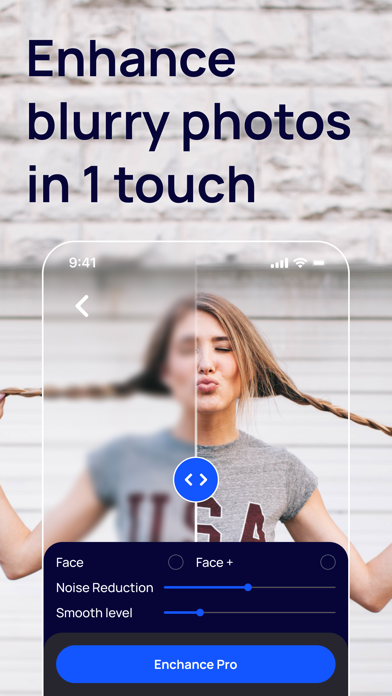
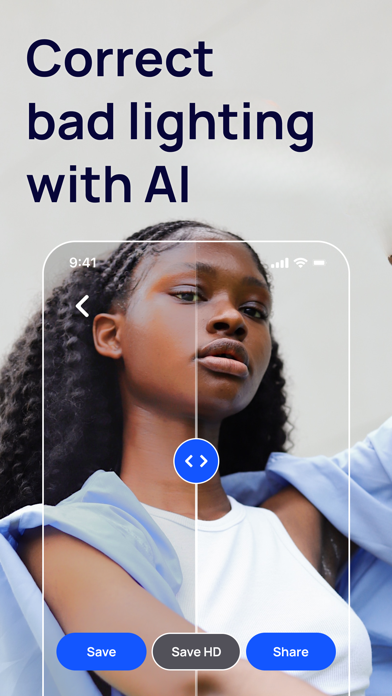
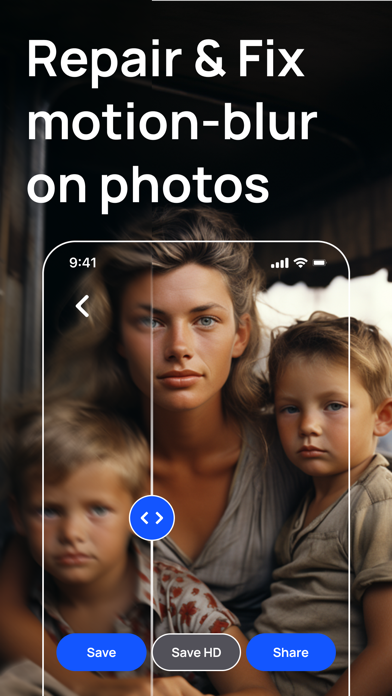
BlurBuster is the ultimate mobile app for anyone looking to improve their photos quickly and easily. With its advanced AI technology, users can transform their photos with just one click. Whether you want to remove blur, correct lighting, colorize, or sharpen your image, BlurBuster has got you covered. To get started, simply select the photo you want to enhance and hit the button. In just a few seconds, you'll have your result, and you can compare the before and after versions. For best results, make sure the faces in your photos are clear and visible, and not too small. With BlurBuster, you can transform any photo into a masterpiece in seconds. BlurBuster features: - Remove Blur from the photo - Make photo clear - Make photos more sharpen - Correct light on photo - Colorize photo - Remove scratches and the yellow tone from an old photo At BlurBuster, we take your privacy and security seriously. Our privacy policy and terms of use can be found at the following links: Privacy Policy: https://kallossoft.com/photo-enhance-privacy-policy Terms of Use: https://kallossoft.com/photo-enhance-terms-and-conditions For our subscriptions, we follow the standard Apple Terms of Use (https://www.apple.com/legal/internet-services/itunes/dev/stdeula/). Try BlurBuster today and see the difference for yourself!

Tien Le
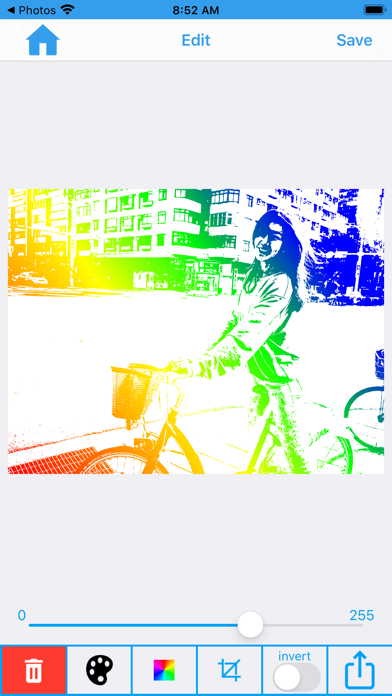
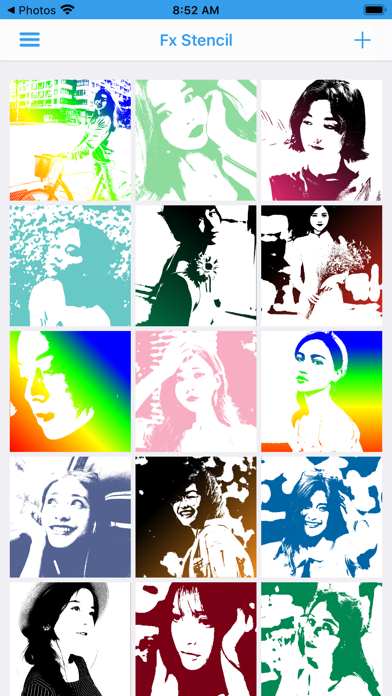
Fx Stencil lets you make a stencil from photo you takes or from your photo album.Very simple and quick. You can edit, share on facebook, save to your album or mail it to your friends and family. With a stencil you can use to print on the wall, clothes, fabric or make amazing gifts that imbued with your own personality. New features with version 3.3.0 - Support Dark mode - New Design UI for app - New core processing - More color for stencil - New Gradient stencil - Save your stencil - Share stencil to social networks and some action for stencil - Crop Image - Custom color - More tool - A simple drawing tools to help you edit image stencil. - Invert Stencil Wish you have fun with Fx Stencil. Sincerely!


SLATE LABS LLC (US)
Upgrade your YouTube experience with AI! Quick summarization - Get video summaries in seconds! Filter out clickbait - Get rid of the fluff and get straight to the point! Save Time - No need to watch lengthy videos anymore! For questions, please email [email protected] Terms of service: https://summarizeyt.com/terms Privacy policy: https://summarizeyt.com/privacy

Raster Field Co., Ltd.
Unlock all the possibilities of your iPhone camera. Remove the over-sharpen, and bring you the natural photos. Live Photo and Portrait Mode? We have you covered. No Fusion supports shooting Live Photo and Portrait Mode in any format. Film simulation, multiple recipes built-in. In manual mode, try every setting you want. Terms of Use: https://www.apple.com/legal/internet-services/itunes/dev/stdeula/

Alexandr Graschenkov
UScale helps improve photos and videos with AI tools for everyday shots, old photo archives, drawings, anime, and creative image upscaling with reconstructed details. What you can do with UScale: • Improve photo and video quality Upscale, sharpen, and clean up blurry or low-resolution media. • Work privately on your device Core photo and video enhancement is processed locally, without uploading your files. • Brighten dark photos Recover detail from underexposed or very dark images. • Restore old photos Repair scratches, folds, dust, and faded details. You can also colorize old images or use advanced restoration for heavily damaged photos. • Restore photo negatives Invert and normalize negative photos before restoration. • Enhance faces Improve face details in portraits and group photos. • Use creative AI enhancement For more expressive results, Creative Upscale can rebuild details with cloud-based AI and output higher-resolution images. • Process multiple photos Select several photos and enhance them in one batch. Free version: • Enhance 2 photos per day • Enhance 5 seconds of video per day • Use the 2x model for daily processing Premium: • Unlimited photo and video enhancements • Full-length video processing • 4x upscaling • Advanced AI access for creative and restoration features UScale was shaped with feedback from photographers and people who work closely with visual media. It is built for people who want cleaner, sharper, more usable photos and videos without a complicated editor. Terms of use: https://upscales.app/terms Privacy Policy: https://upscales.app/privacy_policy

仁超 张
Python Compiler is a powerful and user-friendly Python code editing tool designed for developers, data scientists, and programming enthusiasts. It integrates intelligent code editing, running, debugging, and optimization features to improve Python programming experience and work efficiency. Whether you are writing simple scripts or developing complex applications, Python Compiler can provide you with a smooth and efficient coding experience. It is suitable for beginners to get started quickly and also meets the advanced needs of professional developers. Try it now and unleash your Python programming potential!


IRFAN DEGIRMENCI
Moodshot® – Create content that gets noticed! Stand out on socials with the exclusive filters everyone’s talking about. Whether you're editing selfies, vlogs, landscapes, or memories – Moodshot helps you create cinematic, scroll-stopping visuals in seconds. Unlock the power of filters, overlays, and AI tools in an all-in-one creative studio – built exclusively for iOS. FILTERS & OVERLAYS • 190+ custom filters: Cinematic, Glitch, Duotone, Retro & more • 100+ overlays: Dust, Light Leaks, Bokeh, Snow, Shadow... • Apply to photos, videos, or in real-time with the built-in camera BUILT-IN CAMERA Capture pro-level photos and record stunning videos directly with filters and overlays – no editing needed! EDITING TOOLS Fine-tune your visuals with brightness, grain, blur, vignette, sharpness, and more. AI MAGIC • AI Object Remover – Clean up clutter in seconds • AI Upscale – Sharpen & enhance image quality (up to 4x) • AI Colorize – Breathe life into black & white photos • AI Painting – Turn photos into artworks • AI Dehaze – Clear up foggy or low-light images PRO TIPS • Stack filters & overlays for custom looks • Favorite your go-to filters for faster editing • Enjoy HD previews, even with premium features UNLIMITED ACCESS INCLUDES • Unlimited AI tools • Premium filters & overlays • No ads, no watermarks • Weekly & Annual subscription options MEMBERSHIP TERMS -Prices may vary by location. -Subscriptions are billed weekly, monthly, or yearly, depending on your chosen plan. -Payment will be charged to your iTunes Account upon confirmation of purchase. -Subscriptions automatically renew unless auto-renew is turned off at least 24 hours before the end of the current period. -Your account will be charged for renewal within 24 hours before the end of the current period, based on your selected plan (weekly, monthly, or yearly). -You can manage your subscription and turn off auto-renew in your Account Settings after purchase. -Purchases are non-refundable once confirmed Terms of Use: https://moodshot.net/terms-of-use Privacy Policy: https://moodshot.net/privacy-policy Need help? Reach out to us anytime at [email protected]. If you’re enjoying Moodshot, we’d truly appreciate your support through a rating on the App Store! Your content deserves better. Make it stand out with Moodshot!

Yahor Kamisaruk
Long YouTube video to watch? Or maybe you're just too lazy, but still want to know what it’s about?Just paste the YouTube link and the TellMeBriefly app does the rest — get a quick summary with key insights. Save time, stay informed, and focus on what really matters. Key Features: -Summary: Instantly generate a clear, concise overview of the video’s content without watching the whole thing. -Chapters: Break the video into summarized segments with clickable time codes — jump straight to the parts that matter. -Language Translation: Translate video content from its original language into any supported language so you always understand what’s being said. -Summary Length: Choose between small, medium, or large summaries to get the level of detail you want. Regenerate anytime for a fresh take. -Summary History: Keep track of all the videos you've summarized — revisit past summaries anytime from the home screen. -Emoji Customization: Add or remove emojis for each summary point — highlight the context or keep it plain, whichever you prefer. -Font Size: Adjust the text to your preferred size — enlarge it for better readability. -Dark Mode: Switch to a darker interface for comfortable reading and less eye strain, especially in low light. Subscription Details: -Subscriptions are automatically renewed unless cancelled 24 hours before the renewal. -Subscriptions may be managed by the user and auto-renewal may be turned off by going to the user's Account Settings after purchase. -Free trial portions are forfeited upon subscription purchase. Privacy Policy: https://tellmebriefly.ai/privacy Terms of Use: https://tellmebriefly.ai/terms


MWM
Enter a new era of video editing with Snapcut, the ultimate tool to turn your ideas into stunning videos. Perfectly designed for everyone, from beginners to professionals, Snapcut strikes the perfect balance between simplicity and power, offering cutting-edge features and an intuitive interface. Key Features Basic and Advanced Video Editing: • Cut, merge, and adjust your clips with precision using a multi-track timeline. • Control speed with ultra-smooth slow-motion effects or dynamic accelerations. • Enjoy cinematic transitions and keyframe animations for a professional finish. • Remove backgrounds with a single click (coming soon). • Real-time preview and auto-save for a seamless workflow. AI Magic Movie : • Create a unique movie in one tap with AI: select the duration (15, 30, 45, or 60 seconds) and the mood (Chill, Business, Relax, Workout, etc.). • Let AI automatically synchronize and adjust your clips for a perfect result. • Edit or save the project for later to refine your creation. Unlimited Creativity and Effects : • Add stunning visual effects like glitch, prism, vintage, and more. • Create artistic double exposures and experiment with overlays. • Apply cinematic filters for Hollywood-worthy results. Text & Stickers : • Create unique titles with a complete text editor: fonts, styles (inliner, outliner), colors—everything is customizable. • Bring your videos to life with dynamic animations and modern text effects. • Add stickers or images to personalize your videos. Audio and Music : • Access over 1,000 free music tracks to bring your creations to life. • Sync your videos perfectly with audio using the integrated Beat List for a professional result. • Adjust every detail with precise volume control and advanced mixing options. Simplified Sharing and Exporting : • Export in high quality up to 4K, 60fps with HDR support. • Format your videos for TikTok, Instagram, YouTube, and other social platforms effortlessly. Snapcut is the complete solution to create, edit, and share videos that captivate. Whether you’re a novice or a seasoned editor, bring your ideas to life and inspire the world with just a few taps. Download now and unlock the power of limitless creativity! SnapCut PRO Subscription option: Your SnapCut PRO subscription will automatically renew 24-hours prior to the end of each term (month or year correspondingly) and your card will be charged through your iTunes account. You can turn off auto-renewal at any time in your iTunes account settings, but refunds will not be provided for any unused period of the term. -Terms of Use: https://musicworldmedia.com/products/snapcut/tou -Privacy Policy: https://musicworldmedia.com/products/snapcut/policies -Support: [email protected]


AI Photo Editor Lab SRL
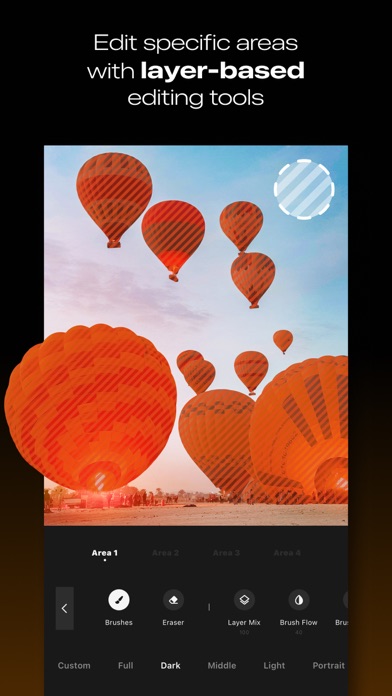
Create expressive, natural and cinematic light with LUMINS. LUMINS takes its name from the Latin word “Lumen, Luminis”, which means “light”. This origin reflects the purpose of the app: giving you precise control over how light shapes mood, depth and atmosphere in your photos. Every tool is designed to let you control how light behaves inside your photo, from subtle glow to dramatic rays, from natural shadows to atmospheric color. LUMINS gives you the ability to enhance illumination, refine depth and create mood with precision and clarity. Key Features: - Light and Glow: whether you are editing portraits, landscapes or creative imagery, LUMINS gives you full control over how light interacts with your scene - Volumetric and Tyndall Effects: create realistic directional light passing through windows, trees or objects. Produce depth and atmosphere commonly seen in high quality photography - Starburst and Lens Effects: add bloom, star highlights, reflections and artistic lens characteristics that enrich the texture and mood of your photos - Shadow and Depth Tools: shape shadows to build dimension and contrast. Control intensity, softness and direction to create dimension and natural contrast - Sky Replacement: replace skies and harmonize tones and lighting to achieve a unified, realistic atmosphere - Color and Mood Controls: refine tones, adjust warmth or coolness, add gradients and design color palettes that transform the atmosphere of your photos - Filters Optimized for Light: use curated filters optimized to support glow, tonal depth and atmosphere. These are designed for realistic light, not generic looks - Precision Brushes and Masks: apply localized adjustments exactly where needed. Edit light, shadows and color with fine control How It Works 1. Import your photo and choose the light or mood you want to create 2. Adjust glow, shadows, atmosphere and color with intuitive sliders 3. Add volumetric rays, star highlights or depth-enhancing tones 4. Export your enhanced photo and share it Express the full meaning of “Lumen” in every shot. Download LUMINS today. Subscribe to access to premium app features; subscription details are the following: - Length: weekly, yearly - Your payment will be charged to your iTunes Account as soon as you confirm your purchase - You can manage your subscriptions and turn off auto-renewal from your Account Settings after the purchase - Your subscription will renew automatically, unless you turn off auto-renew at least 24 hours before the end of the current period - The cost of renewal will be charged to your account in the 24 hours prior to the end of the current period - When canceling a subscription, your subscription will stay active until the end of the period. Auto-renewal will be disabled, but the current subscription will not be refunded - Any unused portion of a free trial period, if offered, will be forfeited when purchasing a subscription Terms of Use: https://www.apple.com/legal/internet-services/itunes/dev/stdeula/