
Recently updated apps
Browse recently updated IPA listings from AltStore and SideStore compatible repositories. These pages help you find fresh builds, changed repository notes, and updated download options without relying on search filters.

N/A
I can only verify that this works with TrollStore. Also, the entire app is in Chinese. Chinese app store, lets you download and install apps such as D

Lãng Khách🇻🇳
Offers the most precise prayer times along with a range of other features including the Quran, Tasbeeh, Islamic Calendar, a compass for Qiblah directi

Neoncat-OG IPA Library
No description available from this source. Use App Store search to learn more about this app.

SamoXcZ
A straightforward Jailbreak Detector. Supports iOS 15.0 to 17.0. A user requested it so here it is. Last updated: 03-26-2024 Status: ✅

Dcsyhi1998
Enables users to play their preferred videos through CarPlay. A demo illustrating video customization is accessible, with forthcoming features encompa

Alfhaily & Qn_
Unfortunately, AltStore can not handle two (or more) applications that have the same bundle ID (uYouPlus, CercubePlus and CercubePlus (Legacy)). I hav
thebaselab Ltd
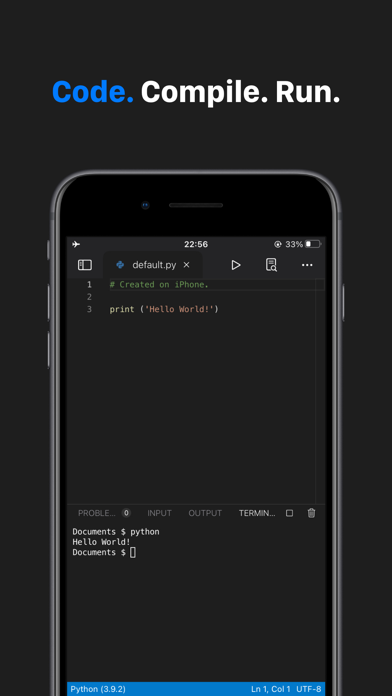
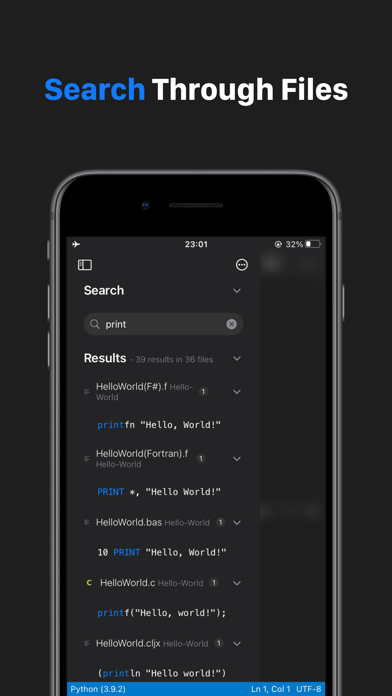
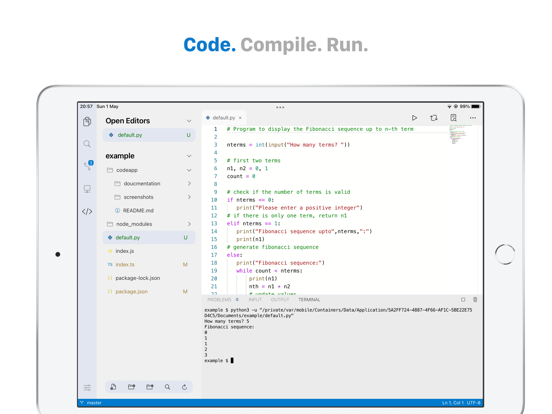
Code App is a MIT-licensed desktop-class code editor for iPadOS with built-in Node.js, Python, C, C++, PHP and Java runtime. We built it because there is nothing else on the App Store provides all these features in one app: * A robust, high-performance text editor (Monaco Editor from Visual Studio Code) * Autocomplete, static code analysis and other language features for Python & Java * First class local file system support * Extensive local language support * SSH / FTP remote connection support (Files and terminal) * Embedded emulated terminal * Git Version Control * Package manager support (pip and npm) * Markdown, themes, server-side snippet execution and more Read Code App's documentation: code.thebaselab.com See the project's source code, roadmap, discussion on GitHub: github.com/thebaselab/codeapp Send us an email: [email protected] Privacy Policy: thebaselab.com/privacypolicies Terms of Use (EULA): www.apple.com/legal/internet-services/itunes/dev/stdeula/

TopHatch, Inc.
Think, plan & create – Concepts is a flexible vector-based sketchbook where you can take your ideas from concept to reality. Concepts reimagines the ideation process – offering a safe and dynamic workspace to iterate and explore your ideas, organize your thoughts, and experiment with designs. With our infinite canvas, you can: • Sketch plans and whiteboard ideas • Make notes, doodles, and mindmaps • Draw storyboards, product sketches and designs Concepts is vector-based, making every stroke editable and scalable. With our Nudge, Slice and Select tools, you can easily change any element of your sketch without redrawing it. Talented creators at Disney, Playstation, Philips, HP, Apple, Google, Unity and Illumination Entertainment use Concepts to develop and realize extraordinary ideas. Join us! Concepts has: • An infinite canvas with optional paper types and grids • Realistic pens, pencils and brushes that flow with pressure, tilt and velocity or create your own • A tool wheel or bar you can personalize • HSL, RGB and COPIC color wheels • Editable vector-based sketching – move, organize and edit the tool, color, size, scale, smoothing, opacity; transform or nudge lines to shape them • Unlimited layers • Scale and measurement tools that calculate real-world dimensions With Concepts, you can: • Drag + drop images + PDF files • Create, store and share vector Object libraries • Export images, vector SVG + PDFs to scale for printing or efficient flow between apps (including Procreate, Sketchbook, AutoCAD and Adobe) • Share directly to email, text, Files, cloud, photos, or your favorite social apps and present with AirPlay or a second screen • Store your work safely in your personal iCloud Drive FREE FEATURES • Infinite canvas • A selection of paper, grid types & tools to get you started • The full COPIC color spectrum, RGB and HSL color wheels • Five layers • Unlimited drawings • JPG exports PAID FEATURES Subscription: • 200+ brush and Object libraries, features, and services • Enjoy Team Sharing for smooth collaboration, including live-sharing of object libraries, color palettes & brushes, with new updates arriving all the time • Unlocks everything across platforms • TRY PREMIUM FREE FOR 7 DAYS One-time-purchases: • Buy the Essentials for life and unlock selection & editing tools, infinite layers, shape guides, custom brushes, custom grids, and exports to PNG / PSD / SVG / DXF. • Pay for advanced features as you need them – object packs, professional brushes & PDF workflows are sold separately • Limited to the platform you purchase on Terms & Conditions: • Monthly and yearly subscription payments are charged to your iTunes account at the time of purchase. • Your plan will renew automatically at the end of the billing period unless canceled 24 hours before the billing period ends. • You can cancel or make changes to your subscription at any time in your iTunes Account settings. • Unused portions of any free trial period are forfeited if you make changes to your subscription. We’re dedicated to quality and update frequently based on your feedback. Your experience matters to us. Chat with us in-app via Ask Us Anything, email us at [email protected], or find us anywhere with @ConceptsApp. COPIC is the trademark of Too Corporation. Many thanks to Lasse Pekkala and Osama Elfar for the cover art!
retr0devops
A standalone, straightforward one-click cracking tool for CopyLog. Note: Support will not be provided for this so please refrain from submitting any i


Crunchyroll, LLC
WATCH THE MOST POPULAR AND TOP-RATED ANIME ANYTIME, ANYWHERE Stream new episodes, classic favorites, and anime movies with the Crunchyroll app. Whether you love action-packed anime, heartwarming slice-of-life stories, or fantasy adventures, Crunchyroll offers the largest anime collection online, featuring a massive library of anime shows and movies available on your favorite device. Watch anime ad-free and in high quality—all in one place. EXCLUSIVE MUSIC VIDEOS AND CONCERTS Get access to thousands of music videos, concert exclusives, and special performances from top artists worldwide. Watch unique behind-the-scenes footage, live performances, and carefully curated playlists that bring anime soundtracks and J-pop sensations to your screen. APP FEATURES ■ Watch anime subbed and dubbed—choose from multiple languages (dub availability varies). ■ Create Crunchylists—make playlists of episodes and favorites. ■ Explore every genre—action, adventure, romance, comedy, supernatural, fantasy, slice of life, and more. ■ Stay up-to-date with simulcast episodes—watch shortly after they air in Japan. ■ Discover Crunchyroll Originals—watch exclusive anime titles created in collaboration with top studios. ■ Enjoy interactive recommendations—get personalized suggestions based on your viewing habits. ■ With Crunchyroll Premium save with the annual plan. ■ Ad-free streaming—enjoy your favorite anime without interruptions. ■ Early access to new episodes—watch shortly after they air in Japan. ■ Offline viewing—download episodes to watch anytime (available for Mega Fan and Ultimate Fan members). ■ Multiple device streaming—watch on up to six devices simultaneously with Ultimate Fan membership. ■ Crunchyroll Game Vault—play exclusive mobile games with no ads or in-app purchases (Mega Fan and Ultimate Fan members). STREAM THE LARGEST ANIME LIBRARY Over 2,000 titles available, including critically acclaimed Crunchyroll Originals, such as Tower of God, The God of High School, and FreakAngels. ANIME SHOWS ■ One Piece ■ Solo Leveling ■ Attack on Titan ■ My Hero Academia ■ Frieren: Beyond Journey’s End ■ Blue Lock ■ The Apothecary Diaries ■ Dan Da Dan ■ Jujutsu Kaisen ■ Demon Slayer ■ Naruto Shippuden ■ Vinland Saga ■ Dragon Ball: DAIMA ■ And more ANIME MOVIES ■ Suzume ■ Dragon Ball Super: Super Hero ■ Jujutsu Kaisen 0 ■ My Hero Academia: You’re Next ■ Demon Slayer: Mugen Train ■ One Piece Film Red ■ Your Name ■ And many more DOWNLOAD NOW AND START WATCHING THE BEST ANIME SERIES AND MOVIES—ALL IN ONE PLACE IN-APP PURCHASING AND AUTO-PAY INFO ■ Your account will be automatically charged upon confirming membership. ■ Membership auto-renews unless turned off at least 24 hours before renewal. ■ Your account will be charged monthly for renewal within 24 hours before the current period ends. ■ Subscription pricing may vary based on region and selected membership tier. Privacy Policy: https://www.sonypictures.com/corp/privacy.html Terms of Service: https://www.crunchyroll.com/tos

Dark Noise LLC
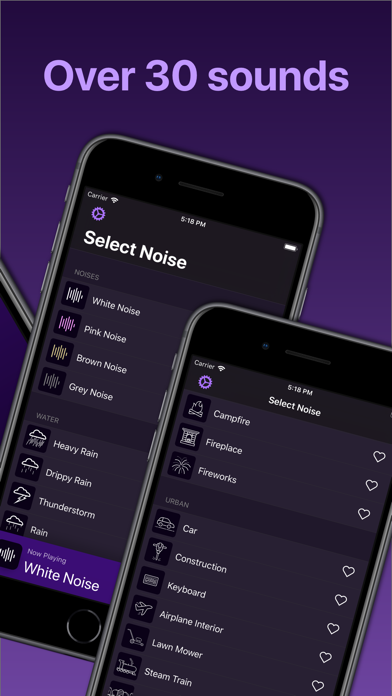
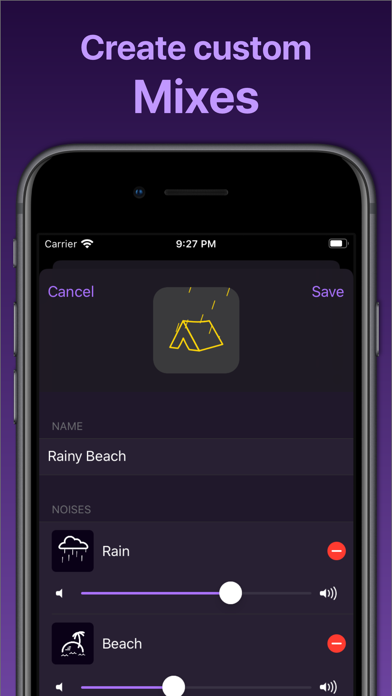
Dark Noise is a simple yet powerful way to play ambient noise to help you sleep, focus, or relax. Each of the 50+ high quality sounds features a delightfully animated icon that brings the sound to life. Create custom mixes for an endless variety of soundscapes. Deep integrations with iOS and Shortcuts make it easier than ever to start an ambient noise with a tap or even your voice! • 50+ sounds • Create custom mixes • Set a timer to fade out noise before you wake up • Start a noise with your voice using Siri Shortcuts — even on your HomePod • 10 themes including True Black • AirPlay support • Many interactive widget to play your sounds with loads of customizations • Lock Screen interactive widgets with all customizations • Over 20 custom Home screen icons • More to come! For in-app purchases and subscriptions, see https://www.apple.com/legal/internet-services/itunes/dev/stdeula/

AltStore Official

Brushed Type Ltd
Doppler is a beautifully designed FLAC player and MP3 player with support for many file formats. Import music and playlists to listen offline, and edit song and album artwork and info without syncing. Doppler's design adapts itself to match your music, and offers quick access to your now playing queue. Tap straight into a recently added album or use search to browse your music. Music and playlists are always stored local on your device, so you have your full Library whenever you need it — even offline. Doppler even imports new files automatically to make sure your Library is always up to date. Doppler supports a wide variety of different music file formats, including FLAC, MP3, WAV, AAC, M4A and many more. Music files are stored local on your device for offline playback. Doppler works great for flights and the metro where you don't have WiFi. Doppler supports Bluetooth and AirPlay 2 so you can listen in your Car or through AirPods, HomePod or any bluetooth enabled speaker. Doppler now also includes a CarPlay app. To help keep your Library organised Doppler supports editing metadata for Songs and Albums — directly on your device and without the need for a computer. Doppler also offers the option to find and download missing artwork. Features: - Beautiful, intuitive design - Reliable offline and local playback - Support for MP3, FLAC, AAC, WAV and many other audio formats - Create and edit playlists - Edit song metadata - Recently Added albums - Full library search - Import your existing albums and playlists - Edit your now playing queue as you listen - Listen through AirPods, HomePod or any bluetooth enabled speaker - Import new music automatically - Share album infomation quickly with friends - Support for Last.fm - Search and download album artwork - Import music from Safari, Dropbox, Google Drive and more - Import music from your computer over WiFi - Listening Reports / Year in review --- Please note: Doppler works as an offline music player and supports local music files. Doppler is not able to import your songs or playlists from Apple Music.

TestFlight
A simple, powerful, and fast youtube video downloader now for iOS. Note: Beta version decrypted from TestFlight: Only compatible with iOS17 and later.

Neoncat-OG IPA Library
No description available from this source. Use App Store search to learn more about this app.

EhPanda-Team
A strictly 18+ NSFW manga reader. Newer releases support only iOS 15, and newest releases only support iOS 16, which is not compatible with TrollStore

Egal Net di Ettore Gallina
Electrical Calculations is professional calculation software designed for installers, designers, and electricians. It is a versatile and reliable tool, capable of generating clear and informative reports in PDF and printable formats. Supported standards: IEC (International Electrotechnical Commission), CEI (Comitato Elettrotecnico Italiano), NEC (National Electrical Code), CEC (Canadian Electrical Code). The application offers a wide range of calculations for the fundamental aspects of an electrical system, wiring diagrams, and formulas. Main calculations: Wire size, voltage drop, current, voltage, active / apparent / reactive power, power factor, resistance, Maximum wire length, Current carrying capacity of insulated conductors / bare conductors / busbar, Conduit fill, Sizing the circuit breaker, Admissible let-through energy of the cable (K²S²), Operating current, Reactance, Impedance, Power factor correction, Power factor correction of transformer MV/LV, Capacitor power at different voltage, Earthing system, Short circuit current, Conductor resistance, Calculation of the cable temperature, Power losses in cables, Neutral current, Temperature sensors (PT/NI/CU, NTC, Thermocouples…), Analog signal values, Joule effect, Fault current of strings, Risk assessment of overvoltages with atmospheric origin. Electronic calculations: Resistor / Inductor color code, Fuses, Sum resistors / capacitors, Resonant frequency, Voltage divider, Current divider, Zener diode as voltage stabiliser, Resistance to reduce voltage, Resistance for led, Battery life, Primary/Secondary winding of transformer, Antenna length, CCTV Harddrive/Bandwidth calculator. Calculations concerning the motor: Efficiency, Motor from three-phase to single-phase, Capacitor start motor single-phase, Motor speed, Motor slip, Maximum torque, Full-load current, Diagrams of the three-phase motor, Insulation class, Motor connections, Motor terminals marking. Conversions: Δ-Y, Power, AWG/mm²/SWG table, Imperial / metric conductor size comparison, Section, Length, Voltage (Amplitude), sin/cos/tan/φ, Energy, Temperature, Pressure, Ah/kWh, VAr/µF, Gauss/Tesla, RPM-rad/s-m/s, Frequency / Angular velocity, Torque, Byte, Angle. Resources: Fuses application categories, UL/CSA fuse class, Standard resistor values, Tripping curves, Table of cables reactance, Table of resistivity and conductivity, Table of unitary voltage drop, Dimensions and weight of cables, Power distribution systems (TT, TN, IT), IP/IK/NEMA protection classes, Atex marking, Appliance classes, CCTV resolutions, Thermocouple colour codes and data, ANSI standard device numbers, Electrical symbols, Electricity around the world, Plug and socket types, IEC 60320 connectors, C-Form Sockets (IEC 60309), Nema connectors, EV charging plugs, Wiring color codes, SI Prefixes, Units of measurement, Pipes dimensions. Pinouts: Ethernet wiring (RJ-45), Ethernet with PoE, RJ-9/11/14/25/48, Scart, USB, HDMI, VGA, DVI, RS-232, FireWire (IEEE1394), Molex, Sata, Apple Lightning, Apple Dock Connector, DisplayPort, PS/2, Fiber optic color code, led, Raspberry PI, ISO 10487 (Car audio), OBD II, XLR (Audio/DMX), MIDI, Jack, RCA color coding, Thunderbolt, SD Card, Sim Card, Display LCD 16x2, IO-Link. The app also contains a very useful form. Terms of service (EULA): https://www.egalnetsoftwares.com/terms_of_service_app/

TigiSoftware / CyPwn IPA Library / iOS_TrollStore
Cracked, NoURLScheme version requested. iOS filesystem explorer. Note: If you can't get an app back from the AppStore after installing it with TS, thi

Apple
Final Cut Camera puts you in the director’s chair with intuitive pro controls for your entire video production. Seamlessly start a Live Multicam session by connecting up to four devices running Final Cut Camera to preview, record, and sync your video angles in Final Cut Pro for iPad. Capture with powerful settings including shutter speed, ISO, white balance, and manual focus. Easily customize your resolution, frame rate, color space, and more. Quickly monitor your video with focus peaking and overexposure indicators. Dial in the perfect shot for your professional videos with Final Cut Camera. Capture professional footage with full manual control • Easily record in a range of resolutions, frame rates, and codecs including ProRes and Apple Log* • Capture ProRes RAW in open gate for full-frame resolution and incredible editing performance** • Set your exposure with ISO and shutter speed controls • Adjust your white balance using presets or set a custom color temperature • Pull focus to follow the action and keep subjects sharp • Enable timecode options including Time of Day, Record Run, or external timecode • Genlock multiple video sources with precise frame alignment using a compatible sync generator** • Flexibly frame your shot in portrait or landscape with the Center Stage front camera without moving your iPhone*** • Record with Spatial Audio for videos with even more immersive sound**** • Reduce shakiness and movement during capture by enabling stabilization • Lock orientation to ensure your framing is consistent regardless of device position Preview, record, and sync up to four devices with Live Multicam in Final Cut Pro for iPad • Quickly start a Live Multicam session by connecting your device to Final Cut Pro for iPad***** • Remotely preview, adjust pro controls, and initiate recording on all your connected devices right in Final Cut Pro • Instantly edit your multicam clips with preview media that is automatically synced in the Final Cut Pro browser • Save time in post with background media transfer that seamlessly replaces preview media with originals as you work Confirm videos look and sound perfect with powerful monitoring tools • Level videos with tilt and roll indicators or crosshairs for overhead shots • Preview your Apple Log video in SDR or HDR by applying the Apple Log LUT* • Enable focus peaking to ensure footage looks sharp • Properly expose videos using zebra indicators • Frame your shot with aspect ratio guides or grid overlays • Monitor available recording time and audio meters Easily review and transfer media right in the browser • Save videos to Files or record onto a connected external storage device* • Browse and review your footage directly in the Final Cut Camera browser • Quickly connect to Final Cut Pro for iPad and transfer media directly into a project • Conveniently pause and resume media transfers Upgrading to the latest iOS or iPadOS is recommended * Requires iPhone 15 Pro or later ** Requires iPhone 17 Pro *** Requires iPhone 17 or iPhone Air **** Requires iPhone 16 or later ***** Requires Final Cut Pro for iPad subscription
ABBYY USA Software House Inc
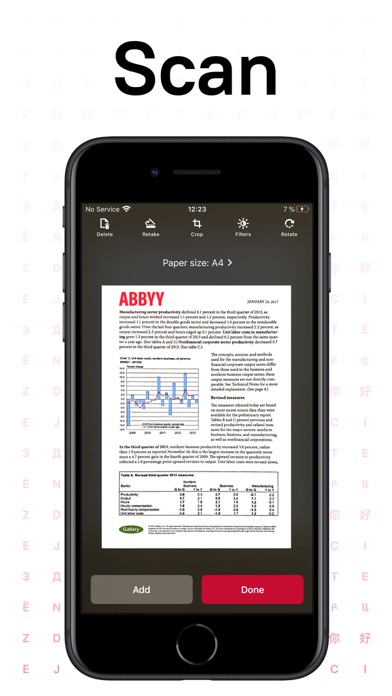
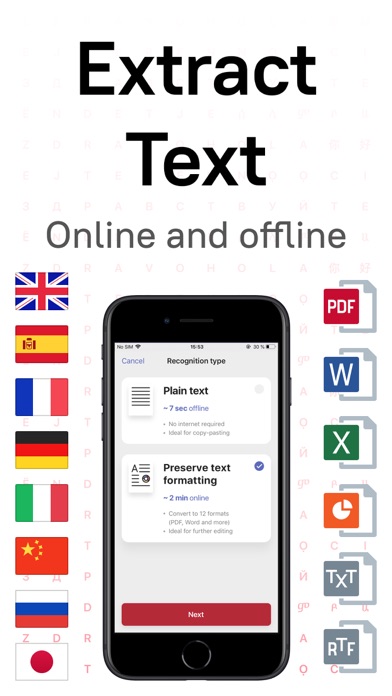
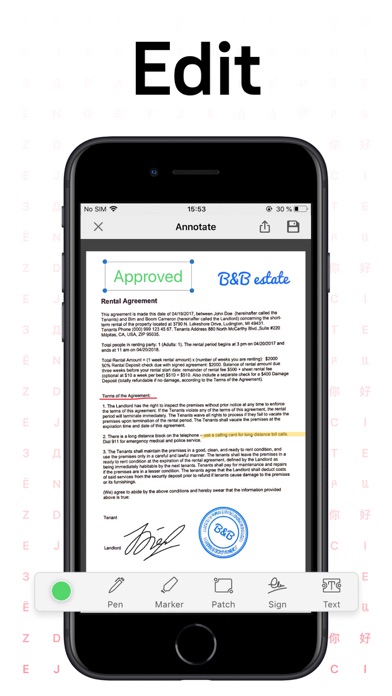
ABBYY FineReader PDF Pro - the first smart AI-powered scanner that turns your mobile device into an all-purpose tool to quickly capture docs and books, create electronic copies in PDF and JPEG, and extract texts from scans for further editing and sharing. FineReader PDF Pro - the top mobile scanner for iPhone or iPad from ABBYY, a Digital Intelligence company. *** Ranked #1 Business application in 98 countries *** *** Winner of SUPERSTAR Award in the "Document Capture" category in the Mobile Star Awards *** Use FineReader PDF Pro to scan paper documents, books, agreements, receipts, magazine articles, notes, recipes, charts, tables, slides, whiteboards, or even billboards on the street and get perfect digital copies. KEY FEATURES • PDF & JPEG. Scan any text and save scans to JPEG images or cross-platform PDF documents. • OFFLINE OCR. Quickly extract text from scans into TXT format on your device without an internet connection. • ONLINE OCR. Recognize text (OCR) on scans in 183 languages (including Latin, Cyrillic, Chinese, Japanese, and Korean alphabets) and choose from among 4 output formats. • SHARE & EXPORT. Send results by email, to FineReader PDF for Windows, save in cloud storages - iCloud Drive, Dropbox, Google Drive, Yandex.Disk, Evernote, OneDrive for Business, and more. • LIVE TEXT. Make phone calls, send emails, follow the links, and more from scanned docs. • ABBYY NEURAL NETWORK. The smart gallery will automatically classify documents into 7 types: A4, books, business cards, handwritten, IDs, other docs, and receipts. • SEARCH TEXT ON PHOTOS. Type the text from a photo into a Search field in the gallery. FineReader PDF Pro will find photos that have this text. • AR RULER. Define doc size in AR. It will be useful for non-standard documents and further printing them out in proper proportions. • SIRI SHORTCUTS. Open scans with Siri and set the flow of actions with scans using Shortcuts app. • ANNOTATE SCANS. Discover a set of easy-to-use tools to modify your PDFs: add your signature or a text box, use a highlighter, write with a pen, or conceal content with the redaction tool. • 3D TOUCH & SPOTLIGHT SEARCH SUPPORT. • PASSWORD ON PDF. Add a password for the image-only PDF files while exporting and sending via email. • MULTIPAGE DOCS. Create, edit, and enhance separate images or large multi-page documents without any additional selection on the viewfinder. • AUTO-CAPTURE AND FILTERS. Excellent visual quality with auto-capture of page boundaries and advanced image filters, which process scans in color, greyscale, or black-and-white versions. • BUILT-IN FILE STORAGE. Save scans inside the app with tags and search capabilities. • Transfer docs to your Mac or PC using Home Sharing. • AIRPRINT. Print out scans directly from your iPhone or iPad. Read us: abbyy.com/blog/mobile Facebook.com/ABBYYsoft Twitter @ABBYY_Software YouTube.com/ABBYYvideos Do you like FineReader PDF Pro? Please leave a review!


Flighty LLC
"Don't Fly Without This App" WSJ • Finalist for App of The Year • Winner of Apple Design Award The flight tracker your pilot uses. Free trial does not required credit card. No account required. No newsletters. No ads. ▶ WORLD'S FASTEST DELAY ALERTS - 2-90 minutes faster than airline apps - 24-48 hours faster cancellation alerts - Always be the first to know, with no effort ▶ INDUSTRY-FIRST FEATURES - See WHY you're flight is delayed - 25-hour where's my plane - Flighty Friends – private sharing among family/friends - Pilot-Grade data – FAA and Eurocontrol - Delay Predictions - Flighty Passport – auto-create your personal flight map - Airport Intelligence – plain word summary of the status - Taxi times - Ground radar - Proximity radar ▶ AUTOMATIONS - Calendar sync - TripIt sync - Email forwarding - Flighty Friends: private flight sharing with friends ▶ PILOT-GRADE DATA - Live-streaming - Actual flight plans - Commercial data – same source used by your pilot - FAA advisories, warnings, and delays - Tail number – with birthday, type, and even name - Full flight timetable - Proximity radar - see flights around you - Ground radar - radar even while taxiing ▶ BE THE FIRST TO KNOW - Late arriving aircraft delays – up to 6 hours before your airline! - Alerts for canceled inbound aircraft - Alerts for airport weather or traffic - Delay forecast ▶ ASSISTANTS - Morning-Of Assistant - wake up informed - Check In Assistant - your reservation number and check in link at the right time - Connection Assistant - make tight connections a breeze - Import Assistant - seamless import (plus data enrichment!) from myFlightradar24, App In The Air, OpenFlights.org, FlightMemory, Logmyflight, and JetLovers ▶ WORLDWIDE + LIVE + UNLIMITED - Every airline - Every flight - 24/7/365 live global coverage ▶ FLIGHTY FRIENDS - Often sharing with Family and Friends? Invite them to see your flights and never manually share again! - Picking someone up, excited for a friend to visit, meeting a colleague? Share your live flight status with one tap. ▶ WHAT'S FREE? - No ads - Unlimited flights - Flighty Friends - Live data - Weather - Actual flight route - Aircraft model and image - Personal flight log and map - Personal all-time and annual stats - Apple Watch app - iCloud backup & sync - Historical flight input and import limited to past 365 days (due to costs) - Lock screen widgets (limited refresh for costs) - Airport Intelligence ▶ WHAT'S PRO? - See why your flight is delayed - Pilot-grade FAA delay alerts - Delay predictions, including the reason why - Industry's fastest push alerts - 25-hour where's my plane - Live lock screen widgets - Live data, even on 'messaging-only' plane wifi - Live activities - Unlimited past flight lookup - Unlimited bulk import - Delay predictions - Arrival forecast - TripIt sync - Calendar sync - Email forwarding - Apple Watch complications - Airport - Tail number - Taxi times - And more Pro is free on your first flight. No trial required. flightyapp.com/privacy Zero personal information is required. flightyapp.com/terms Personal use only. [email protected] for business usage.

Brain Craft Ltd
GIF Maker is an all-in-one app for creating and editing GIFs, powered by AI. Use GIF Maker to create funny GIFs, Boomerangs & Memes. Enjoy our AI engine to generate GIFs from text and swap faces using your photos. ■ Share GIFs on Instagram, Facebook, Twitter, Messenger & more. ■ GIF Maker Special: Huge collection of trending GIFs & memes! ■ AI-powered GIF creation & editing! Features: ======== • Generate GIFs with AI using a text prompt • Convert videos or photos into GIFs • Change faces in GIFs instantly with your photos & AI • Make Boomerang videos for Instagram • Create text-animated GIFs • Remove background from GIFs • Compress GIFs • Create videos from GIFs • Turn photos into funny memes • Create loop video clips • Create GIFs from live camera • Add text to GIFs • Adjust GIF frame speed • Apply beautiful filters to GIFs • Add emojis, stickers & artworks Premium Features: ============== 1. Create unlimited GIFs from videos 2. Make unlimited GIFs from photos 3. Generate GIFs with AI 4. Create text-animated GIFs 5. Generate unlimited memes 6. Access premium filters, stickers & fonts 7. Enjoy an ad-free experience 8. Compress GIFs 9. Remove backgrounds 10. Swap faces Premium Subscription Details: ====================== Subscription price: • Trial: Free for first 3 days, then $9.99 per month. • Trial: Free for first 3 days, then $4.99 per week. • Quarterly: $14.99/3 months. • Yearly: $39.99/Year. - Payment will be charged to iTunes Account at confirmation of purchase. - Subscription automatically renews unless auto-renew is turned off at least 24-hours before the end of the current period. - Account will be charged for renewal within 24-hours prior to the end of the current period, and identify the cost of the renewal. - Subscriptions may be managed by the user and auto-renewal may be turned off by going to the user's Account Settings after purchase. - Any unused portion of a free trial period, if offered, will be forfeited when the user purchases a subscription to that publication, where applicable. Terms and Service: https://braincraftapps.com/apps/i/gif-maker/terms/ Privacy Policy: https://braincraftapps.com/apps/i/gif-maker/privacy-policy/
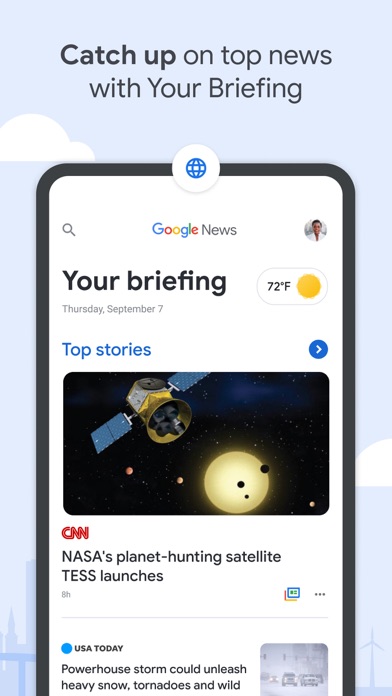
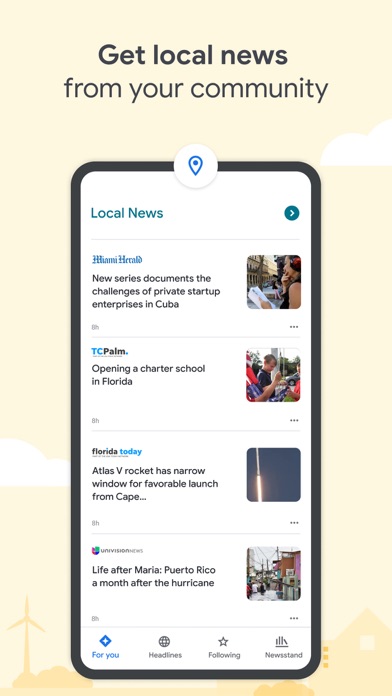
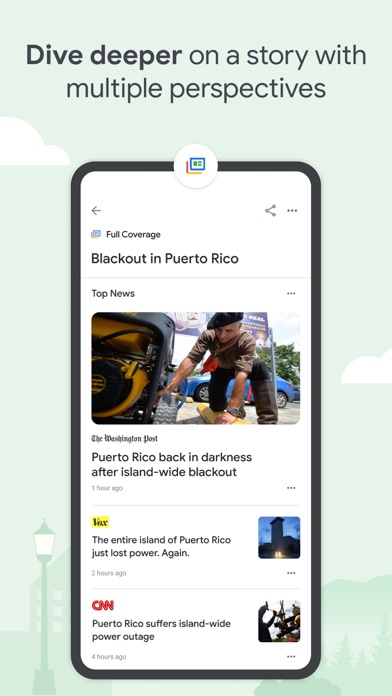
Google News is a personalized news aggregator that organizes and highlights what’s happening in the world so you can quickly catch up and discover more about the stories that matter to you. With Google News, you’ll find: YOUR BRIEFING: It can be nearly impossible to keep up with every story you care about, Your Briefing makes it easy to stay in the know about what’s important and relevant in your world. It updates throughout the day to bring you the top local, national, and world headlines, plus personalized news tailored to your interests. LOCAL NEWS: Explore your community through stories and articles from news outlets in your local area. Customize and choose multiple locations so you can know what’s happening near you or wherever home is. FULL COVERAGE: Dive deeper into a story with multiple perspectives. The Full Coverage feature organizes everything online about a story, surfacing and highlighting coverage from different outlets and mediums. With just a tap, you’ll uncover how the story is unfolding and how everyone is reporting on it. STORIES FOR YOU: The For You section delivers personalized news related to your interests. Take control and customize the articles you see by following the topics and sources you care about. ACCESS FROM ANY DEVICE: Stay up to date on the news no matter where you are. Pair the Google News mobile app with our Desktop website, news.google.com, and enjoy your personalized content across all your devices.


Superhuman Platform Inc
Instantly and easily create smart, polished writing with the Grammarly Keyboard. Designed to deliver real-time writing feedback and provide AI assistance, the Grammarly Keyboard works directly in your iPhone and iPad apps, no copy and paste required. When you join the millions of people using the Grammarly Keyboard, you'll benefit from: An easy-to-use AI keyboard that works in all your apps - Spelling, grammar, and conciseness suggestions in 20+ languages - Typing in 6 languages - Voice dictation with automatic cleanup - Vocabulary and clarity recommendations (Premium only) - Tone detection - Tone transformations (Premium only) - Multi-word text predictions - Smart autocorrect, synonyms, and swipe typing - Emoji predictions and search bar Generative AI rewrites - New versions of your entire message in a couple of taps - Versions adjust for length, fluency, tone, and more - Rewrites are supported in 20+ languages - Works in all your favorite apps Voice dictation finally done right - Fast and accurate, perfect for polished replies on the go - Automatically removes filler words and fixes grammar - Keep your tone intact - Works with a broad range of languages, accents, and speaking paces - Allows for further editing and refinement - Audio is never stored—it’s gone the moment you’re done A document editor for long-form writing and notes - Comprehensive writing feedback - Cloud-based document management - Personal writing statistics - Plagiarism and AI detection - Compatible with hardware keyboards Further improve your writing with Grammarly Premium Grammarly Premium makes your writing more engaging and effective with advanced suggestions for clarity, conciseness, tone, and vocabulary. Premium works across all your devices. If you upgrade to a Premium subscription, payments will be charged to the account associated with your Apple ID. Your subscription will automatically renew unless you cancel at least 24 hours before the end of the current period. After purchase, you can manage your subscription by going to your account settings in the App Store. Privacy is our priority Grammarly practices privacy by design. Your words are your own; we will never rent or sell your data. User Trust Guidelines: https://www.grammarly.com/trust Terms of Service: https://www.grammarly.com/terms Privacy Policy: https://www.grammarly.com/privacy-policy California Privacy Notice: https://www.grammarly.com/privacy-policy#for-california-users